


City On Fire Home App
4.2107.00 Reviews
App Specs
- Version
- 1.4
- Updated On
- License
- Free
- Downloads
- 1,000,000+
- Developer
- Hadiz Studio
- Categories
- Personalization
- Platform
- Android
Screenshots
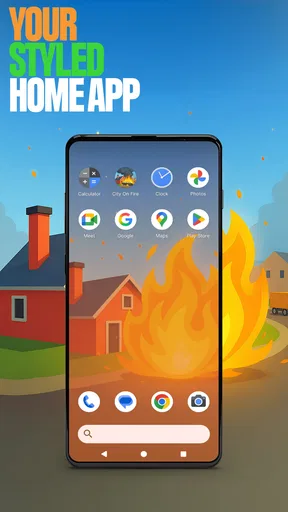
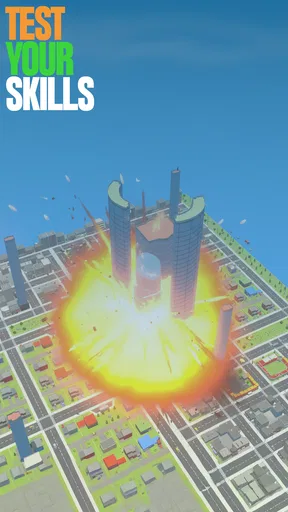
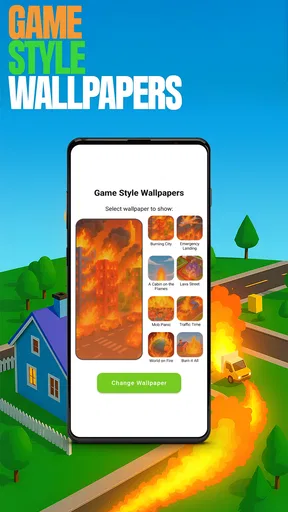
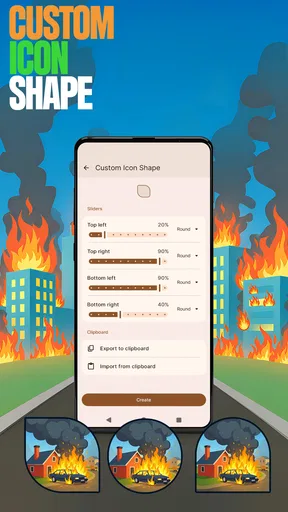
 Analysis by AppCompare
I approached City On Fire Home App expecting a city-building game, but the first practical question with an app like this is whether it feels inviting once you actually open it. Its premise suggests a busy, crisis-prone city, and that can be appealing if you enjoy making small decisions that add up. I would treat it as a casual strategy option to explore at your own pace, rather than assuming it will suit anyone looking for a straightforward, hands-off home-screen tool.
Where the first friction can appear
City-building games often ask new players to learn several systems at once: the layout of a town, the needs of its residents, and the consequences of spending limited resources. Here, the published gameplay description points toward that kind of juggling, with fires, population changes, and shortages as possible pressures. My advice is to resist trying to solve everything at once. When a new task appears, deal with the immediate need first, then return to expansion or decoration when the city is stable.
That distinction matters because a crisis-focused game can feel confusing if you approach it like a relaxed decorating app. If your first session feels hectic, slow down and look for the tutorial guidance before making several changes in quick succession. I find that taking a moment to understand what a prompt is asking is usually more useful than tapping through just to make the screen feel busy.
Checks that make a smoother start
Before deciding that a game is difficult or unresponsive, I usually check the basics: whether it has finished loading, whether the device has a reliable connection if an online feature is being used, and whether the phone has enough free space and current system support. Those are general troubleshooting steps, not special requirements unique to this title, but they can prevent ordinary device issues from being mistaken for a gameplay problem.
The app is a free personalization-category offering from Hadiz Studio, though the city-management play described here is what will matter most to someone deciding whether to try it. It is rated for Everyone, has an average rating of 4.2 from around 7.6 thousand ratings, and has passed one million installs. It was released on October 6, 2025; version 1.4 is listed for devices running Android 8.0 or later. Those details make it easy to judge whether it fits your device and comfort level, but they do not tell you whether its pace will match your taste.
Recovering your routine when play goes off track
If you lose track of a plan, I would return to the city’s most immediate needs instead of trying to rebuild your whole strategy from memory. Check what is currently demanding attention, make one deliberate adjustment, and then see how the city responds. That simple loop is less stressful than changing several things at once, because it gives you a clearer sense of which choice helped and which one created another problem.
For a short play session, I would pick one manageable goal—such as addressing a shortage or making a small expansion—rather than starting a major overhaul just before putting the phone away. It is a practical way to avoid leaving yourself with a scattered list of half-finished decisions. If a screen appears stuck, a calm restart of the app and a check for a stable connection are reasonable general steps; repeated rapid tapping rarely makes a loading problem easier to diagnose.
Worth Reading Before You Choose

EA SPORTS FC Mobile 26 Is a Bigger Football Game, but It Takes Time

Flipboard Shows What News Apps Must Do Beyond the Feed

Switching to Android Auto Means Rethinking Your Driving Routine

Google Calendar Makes a Crowded Week Easier to Manage

Ludo King Makes the Most of the Minutes Between Plans

Baby Panda World Brings Quick Play to Modern Phones, but Its Game Library Feels Busy
When the problem may be somewhere else
Not every rough moment points to a flaw in the game. A busy screen can feel slow when a device is under pressure from other open apps, and an unstable connection can affect features that rely on communicating with other players. I would close unused apps, give the game a fresh launch, and try again when the connection is steadier before concluding that the city itself is broken.
It is also worth separating a design preference from a technical issue. If you dislike being interrupted by emergencies or prefer a calm sandbox where you can build without pressure, the crisis-and-management angle may simply not be for you. In that case, a more relaxed city decorator or a traditional builder with a slower pace would be a better fit than trying to force this one into a different kind of experience.
Setting Up Your City
From the moment I launched the City On Fire Home App, I was drawn into a world where strategy and quick thinking are key. Setting up your city is both intuitive and challenging. You start with a modest plot of land and a handful of resources. The app does a great job of easing you into the gameplay with a series of well-designed tutorials. I appreciated the clear instructions and the freedom to shape my city as I saw fit.
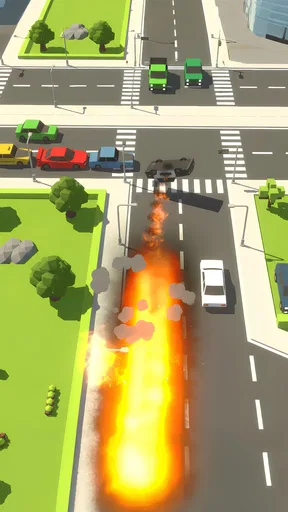
The graphics in City On Fire are vibrant and detailed, making it easy to get lost in the world you're creating. The app also throws in some delightful animations, which add to the immersive experience. Every decision you make affects the city’s growth and stability, and that constant demand for strategic thinking kept me hooked.
Challenges and Gameplay
This is where things get intense. As your city grows, so do the challenges. The dynamic gameplay ensures that you're always engaged. Whether it's a fire outbreak, a sudden influx of new residents, or resource shortages, you're constantly pushed to adapt and plan. I found myself juggling various tasks, from building infrastructure to managing the city’s budget, all while keeping an eye on the happiness of my citizens.
The app incorporates a variety of missions and events that keep the gameplay fresh. One moment, I was expanding my city, and the next, I was dealing with a crisis that needed immediate attention. The unpredictability of these events kept me on my toes and added a layer of excitement to the game.
Social and Competitive Elements
What sets City On Fire apart from other city-building apps is its social and competitive elements. You can connect with friends and other players to compare cities, strategies, and achievements. There's also a leaderboard, which adds a competitive edge. I found myself striving to climb up the ranks, which made the experience even more engaging.
Exchanging resources and tips with friends helped me improve my city and tackle challenges more effectively. This feature fosters a sense of community and collaboration, which I found refreshing in a genre that can often feel solitary.
Final Thoughts
In the end, City On Fire Home App is more than just a game; it's an addictive experience that combines strategy, management, and a touch of unpredictability. The app is well-designed, with a blend of vibrant graphics and engaging gameplay that kept me coming back for more.
Whether you're a fan of city-building games or just looking for something new and exciting to try, I highly recommend giving City On Fire a shot. Just be prepared to spend a few late nights glued to your screen, strategizing your next move. It's a fiery ride you won't want to miss!
A realistic rhythm for everyday play
I can see this fitting into an ordinary evening in short bursts. Imagine opening it after dinner with only a few minutes free: rather than trying to redesign the whole city, I would check the current crisis, make one sensible adjustment, and stop once that immediate decision is settled. On a longer, more relaxed evening, I would use the time to explore the layout and think through how growth might affect stability. The same game can serve both moods, but it is less suited to someone who wants every session to be purely decorative and interruption-free.
A useful habit is to give yourself a clear stopping point before you begin. Missions and unexpected events can make “one more task” tempting, so choosing a small goal in advance helps keep play from taking over a quick break. This is not a special setting or hidden feature; it is simply a way to enjoy a management game without letting its next prompt decide how long you stay.
Choosing it over other city apps
Compared with a quiet builder, the appeal here is the pressure to respond, not just the satisfaction of laying out a neat-looking town. If you enjoy balancing expansion against emergencies, that tension gives each decision more weight. If you mainly want to arrange streets and buildings at your own pace, a sandbox-style alternative may be more relaxing. And if you prefer a compact puzzle with a clear finish, the ongoing city-management loop may feel less focused than a level-based game.
That trade-off also helps set expectations around the social side. Comparing cities and exchanging advice can make the experience feel less solitary, but competitive rankings are only motivating if you enjoy measuring progress against other people. I would use those elements as optional inspiration rather than as a reason to rush. A friend’s strategy may offer an idea, but copying it without considering your own city’s immediate needs can create more work than it solves.
Who is likely to enjoy the management
I would recommend trying it if you like watching a small settlement develop, enjoy switching between planning and urgent decisions, and do not mind learning a few connected systems. The tutorial-led start is helpful for someone new to city management, while the missions and events give experienced players reasons to keep adjusting their approach. The strongest fit is someone who finds a little pressure engaging rather than stressful.
I would skip it if you want a purely calm decoration app, dislike resource decisions, or become frustrated when a game asks you to respond to changing priorities. It may also be the wrong choice if your main interest is social play and you do not care about managing a city; the comparisons and exchanges are supporting parts of the experience, not a substitute for the core planning loop. For those players, a dedicated social app or a slower builder is likely to feel more natural.
Small decisions that make the experience clearer
One non-obvious way to make progress easier to understand is to change only one part of your plan at a time. If you expand, adjust services, and react to a shortage all together, it becomes hard to tell which choice improved the situation. A single change followed by a quick check of the city’s response gives you better feedback and helps you learn the game’s rhythm without relying on guesswork.
I would also treat the tutorials as reference points, not something to rush past simply because the opening feels familiar. The early guidance can help establish what the game expects from you; later, when a mission or emergency shifts your priorities, that foundation makes it easier to decide what to do next. If you are sharing advice with friends, describe the problem you faced as well as the solution. Context matters: a tactic that works during a shortage may not be the right move while the city is growing.
Practical verdict
My overall impression is that this is best approached as an active city-management game with a lively presentation, not as a quiet wallpaper-like personalization tool. Its combination of construction, changing demands, and social comparison gives it more variety than a simple builder, while also making it less predictable. The free price makes it straightforward to try, and the Everyone rating makes its intended audience broad, but neither fact guarantees that the pace will suit every player.
If you give it a try, start patiently, follow the guidance, and make small decisions you can evaluate. That approach should help you tell whether the mix of planning and pressure is enjoyable for you. I would keep it on my shortlist for a casual strategy session when I want a city that asks me to pay attention; for a no-pressure creative break, I would choose a calmer alternative instead.
Pros
- Intuitive user interface
- easy to navigate.
- Real-time alerts for fire emergencies.
- Customizable notifications for specific areas.
- Offline access to safety guides.
- Integration with smart home devices.
Cons
- Limited language options available.
- Requires constant internet connection.
- Occasional lag in app updates.
- High battery consumption reported.
- Some features locked behind paywall.
FAQs for City On Fire Home App
What is City On Fire Home App and what does it offer?
City On Fire Home App is an innovative application designed to enhance your simulation gaming experience. It provides players with a dynamic virtual city environment where they can engage in strategic planning and management. The app offers interactive features, challenges, and objectives to keep users engaged while building and managing their own city.
Is City On Fire Home App available on both Android and iOS platforms?
Yes, City On Fire Home App is available for download on both Android and iOS platforms. You can find it on the Google Play Store for Android devices and the Apple App Store for iOS devices. It is optimized for a smooth performance across different devices.
Does City On Fire Home App require an internet connection to play?
City On Fire Home App primarily requires an internet connection for initial download and certain features such as updates and cloud saving. However, once the game is installed, many of its core features can be enjoyed offline, allowing players to engage in city planning and management without needing constant connectivity.
Are there any in-app purchases in City On Fire Home App?
Yes, City On Fire Home App includes optional in-app purchases. These purchases provide players with additional resources, customizations, and enhancements that can enrich gameplay. While these purchases can enhance your experience, they are not necessary to enjoy the full game, and players can progress without spending money.
Can I sync my progress in City On Fire Home App across multiple devices?
Yes, City On Fire Home App allows players to sync their progress across multiple devices. To do this, you'll need to create an account within the app and ensure that you are logged in on all devices. This feature is especially useful for those who want to maintain their city management activities on both their smartphone and tablet.


